Short answer: Turnitin makes iThenticate, and many journals screen submissions through Crossref Similarity Check, which is powered by iThenticate. The Turnitin you may know from university is built for coursework; iThenticate is built for researchers and publishers. The $125 figure is the price of iThenticate's individual Single credit. It is not a fee journals charge you. If you only want to look at text overlap before submitting, you can pre-check a draft with SciCampus Similarity Check, as long as you keep its limits in mind (see below).
Editorial disclosure: SciCampus publishes this article and also offers the Similarity Check tool discussed below. We have tried to describe other services only as far as their own documentation supports.
What is the difference between iThenticate and Turnitin?
Both are Turnitin products. According to Turnitin's own help centre, the two use the same database to identify overlapping text but are designed for different users and workflows. Turnitin (Feedback Studio) is designed for classroom use and is usually reached through an institution. iThenticate is meant for authors and publishers preparing work for publication.
One practical difference is where your document ends up: Turnitin's help page says documents uploaded to iThenticate are generally not compared against the Turnitin repository, and vice versa.
Question | Turnitin (classroom) | iThenticate | SciCampus Similarity Check |
|---|---|---|---|
Designed for | Instructors and students | Researchers, authors, publishers | Authors pre-checking a draft |
Access | Through an institution | Publisher or institution access, or individual credits | Directly on the site; the free plan allows 1 run per day, up to 3,000 words |
Compares against | Turnitin's database (shared with iThenticate) | Turnitin's database, including content contributed by Crossref members | Published academic sources (e.g. Crossref, OpenAlex, arXiv, PubMed, Semantic Scholar); no private student-paper repositories |
Typical use | Coursework checks | Editorial screening and author checks | Inspect matched passages and open source links before submission |
What do journals use to screen manuscripts?
Crossref describes Similarity Check as a service provided by Crossref and powered by iThenticate. Member publishers contribute their published content to Turnitin's database and in return get iThenticate at a reduced cost. Journals do not all handle it the same way:
Springer Nature: its Snapp editorial system integrates iThenticate and can recommend that editors review the report when similarity to published work is high or falls in key sections.
Taylor & Francis: its policy says a paper may be submitted to Crossref Similarity Check at any point during peer review or production.
Other publishers differ, so check your target journal's author guidelines and editorial policies.
How do I read an iThenticate similarity report?
Crossref's guidance is blunt: iThenticate does not check for plagiarism; it checks for similarity. The score is the number of matching words divided by the document's total word count, and it changes with the repositories searched and the exclusions applied (for example quotes, bibliography or small matches). A useful first question is: which passages are driving this score?
What does the $125 iThenticate credit cover?
On iThenticate's pricing page, the individual Single package is listed at $125 (excluding taxes) for one manuscript of up to 25,000 words, with 5 free revisions and credits valid for 12 months. The page also says AI writing detection is not available to individual users. iThenticate's credits guide confirms the one-credit, 25,000-word, five-revision structure.
Prices and terms change, and some older third-party listings and help pages still show $100, so confirm the current figure on iThenticate's site before buying. Because these credits are sold separately from publisher access, also check whether your institution already provides iThenticate before paying.
How can I pre-check a manuscript with SciCampus?
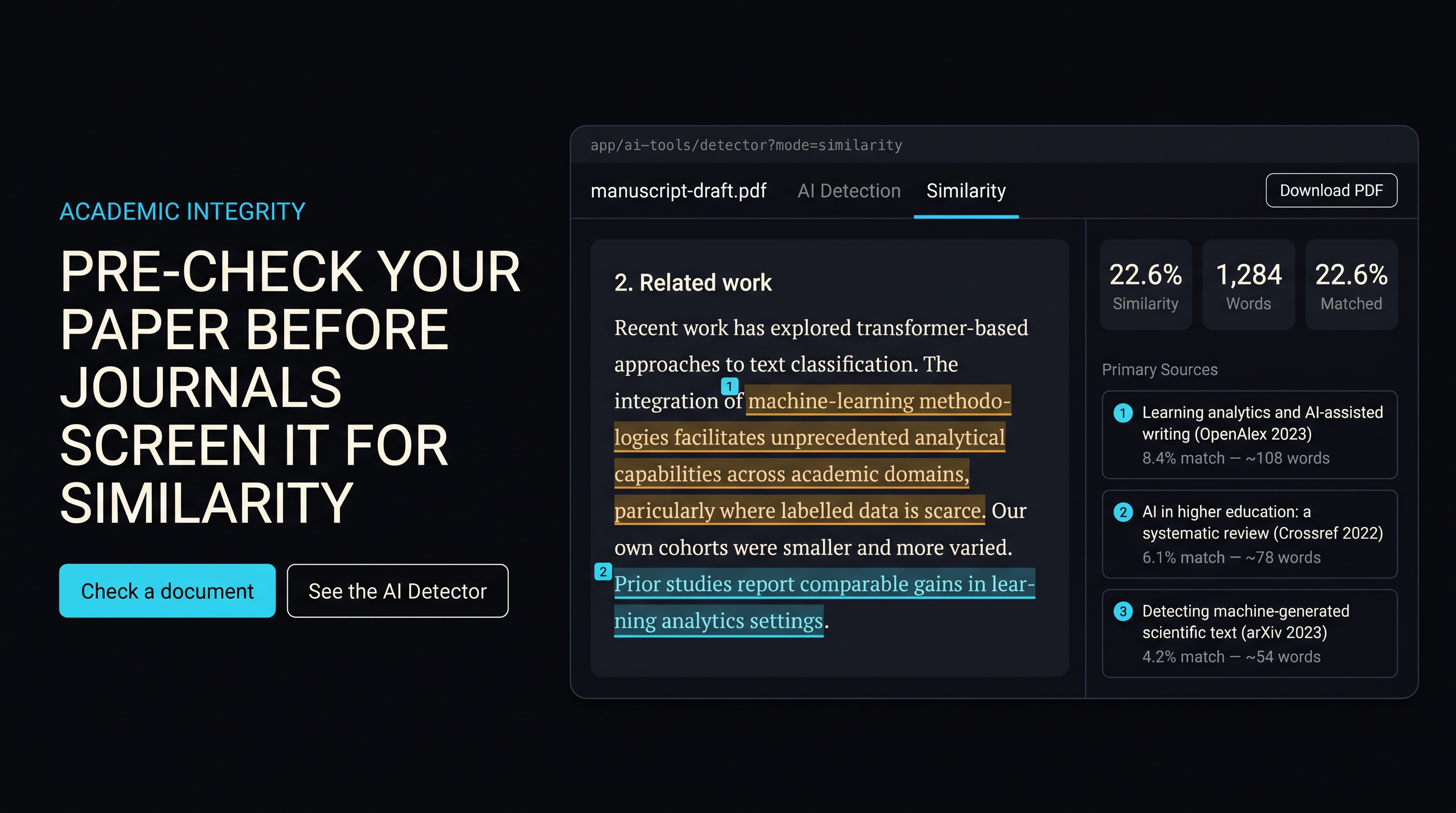
SciCampus Similarity Check runs inside an AI Detector analysis, so one upload covers both. The free plan allows one run per day with a 3,000-word limit per run, so start with the section you most want to review, such as a freshly revised literature review.
Open the source behind each match. Where a source link is available, read your passage and the source side by side. If your summary still follows the source's phrasing, rewrite it in your own words and keep the citation. If exact wording matters, follow your journal's guidance on direct quotation.
Check whether a match is your own preprint. Crossref notes a manuscript can show substantial overlap with its own preprint, but if the authors differ, it may indicate a problem and should be investigated. Check your journal's preprint policy for what to declare.
Fix wording, not just numbers. A lower percentage is not the goal. Clear attribution is.
What a SciCampus check cannot tell you
SciCampus compares your text against published academic sources. It does not search private repositories or the full-text content that Crossref members contribute to iThenticate, so it will not reproduce a journal's iThenticate report or its score. Treat it as an early warning for passages worth rewriting, not as a guarantee of what the journal will see. For background, see SciCampus vs legacy similarity checkers and what AI detection and similarity checking actually measure.
What similarity score is acceptable for a journal submission?
There is no universal number. Crossref's documentation stresses that a flagged section does not automatically mean plagiarism, just similarity, and that high overlap can simply reflect a well-referenced paper with correctly quoted sources. Editors are expected to look at the matched passages in context. A properly attributed quotation and an unattributed borrowed sentence both add to the score, but they call for different decisions. When reviewing your own draft, start with passages where a reader could not tell which words or ideas came from the source.
Pre-submission similarity checklist
Read your target journal's plagiarism and preprint policies.
Check the sections you revised most heavily, especially the introduction and literature review.
Open every source link and compare passages side by side.
Rewrite close paraphrases in your own words and keep the citation.
Put direct quotations in quotation marks, with a citation.
Confirm any preprint match is your own work.
Check whether your institution gives you iThenticate access before buying a credit.
Frequently asked questions
Is iThenticate the same as Turnitin?
They are different products from the same company that share the same underlying database, according to Turnitin's help centre. iThenticate is designed for researchers and publishers rather than classrooms.
Do I have to pay $125 to submit to a journal?
No. $125 is the price of iThenticate's individual Single credit for authors who want their own report. Journals that use Crossref Similarity Check access iThenticate through their publisher arrangement.
Can I use Turnitin for my manuscript?
Turnitin is intended for coursework and is accessed through institutions. Authors preparing manuscripts are pointed to iThenticate instead.
Will a SciCampus score match the journal's iThenticate score?
No. The sources and settings differ, so scores will not match. Use SciCampus to locate passages to review, and rely on the journal's report for its own screening.
Ready to review a draft? Run SciCampus Similarity Check. You can also compare other options in Turnitin alternatives for independent researchers.
Related Reading (Topic Ideas for Future Posts)
How to read a similarity report: exclusions, repositories and what the percentage means
Self-plagiarism and preprints: what to declare when submitting
How to paraphrase a source without drifting from its meaning
What journals expect in a plagiarism and AI-use declaration